Command Palette
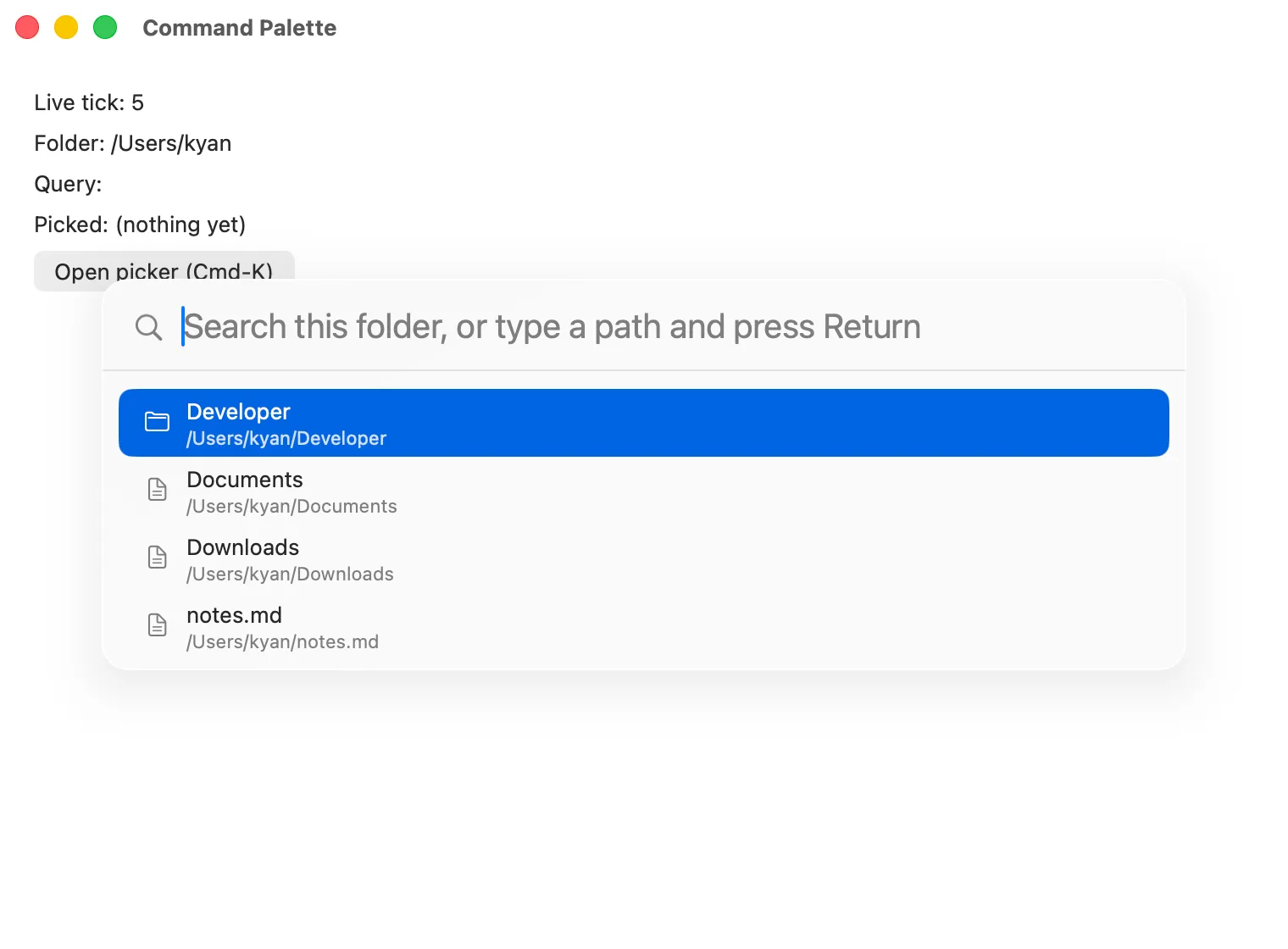
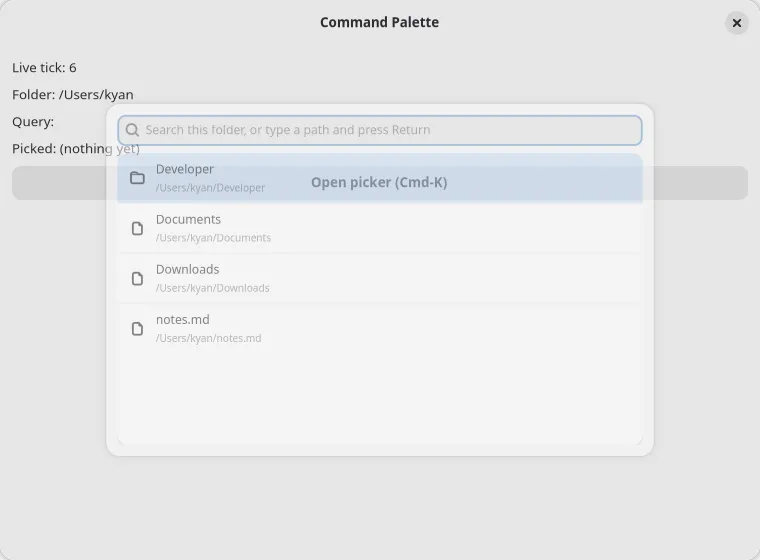
<commandpalette> is a modal overlay for search-driven command, file, and navigation pickers: the
Cmd-K pattern. The widget never filters, ranks, or reorders anything. Every keystroke fires
queryChanged, the app recomputes the result set (locally or over an RPC), and hands the new
items array back down.
import { render, useMemo, useState } from "@nativedesktop/react";
interface Command {  id: string;  title: string;  subtitle: string;  iconName: string;}
const COMMANDS: Command[] = [  { id: "new-file", title: "New File", subtitle: "File > New", iconName: "document-new" },  { id: "new-window", title: "New Window", subtitle: "File > New Window", iconName: "window-new" },  { id: "close-tab", title: "Close Tab", subtitle: "File > Close", iconName: "window-close" },  { id: "toggle-sidebar", title: "Toggle Sidebar", subtitle: "View > Sidebar", iconName: "sidebar-show" },];
function App(): React.ReactNode {  const [open, setOpen] = useState(false);  const [query, setQuery] = useState("");
  // App-side ranking: the widget only ever renders what this returns, in order.  const items = useMemo(() => {    const q = query.toLowerCase();    return COMMANDS.filter((c) => c.title.toLowerCase().includes(q))      .sort((a, b) => a.title.localeCompare(b.title));  }, [query]);
  const runCommand = (id: string): void => {    console.log("run", id);    setOpen(false);  };
  return (    <window title="Command Palette" defaultWidth={640} defaultHeight={420}>      <box orientation="vertical" spacing={8}>        <button label="Open (Cmd-K)" onClick={() => { setQuery(""); setOpen(true); }} />        <commandpalette          open={open}          placeholder="Type a command…"          query={query}          items={items}          onQueryChanged={(e) => setQuery(e.text)}          onActivate={(e) => runCommand(e.text)} // e.text is the activated row's id          onSubmit={() => setOpen(false)}          onCancel={() => setOpen(false)}        />      </box>    </window>  );}
await render(<App />);| Prop | Type | Default | Applied | Notes |
|---|---|---|---|---|
open |
bool | false |
createAndUpdate | Presentation state. Setting it true presents the overlay; false dismisses it programmatically (see Cancel vs. programmatic close). |
placeholder |
string | none | createAndUpdate | Search field placeholder text. |
query |
string | "" |
createAndUpdate | The search field’s text. Controlled: the field never edits itself out from under you. |
items |
CommandPaletteItem[] |
none | createAndUpdate | The result rows, already filtered, ranked, and ordered by the app. The widget renders them in order and never reorders or filters them. |
testID |
string | none | meta | Automation identifier. |
CommandPaletteItem (schema/widgets.json’s shared shape): { id: string, title: string, subtitle?: string, iconName?: string }. id is a stable string the app assigns; it never needs
to be a visible label. It is the value echoed back by activate.
Events
Section titled “Events”| Event | Handler | Payload | Notes |
|---|---|---|---|
queryChanged |
onQueryChanged |
{ text } |
Fires on every keystroke in the search field. |
activate |
onActivate |
{ text } |
text is the activated row’s id, not its title. Fires on Enter with a highlighted row, or a click/tap on a row. |
submit |
onSubmit |
{ text } |
text is the raw, currently-typed query. Fires on Enter with no row highlighted, or Cmd/Ctrl+Enter regardless of highlight. |
cancel |
onCancel |
none | User-initiated dismissal only: Escape, or a click outside the card. See below. |
Ranking
Section titled “Ranking”The palette does no matching. Substring match, fuzzy score, recency, an RPC round-trip to a
server-side index: all of it happens in your onQueryChanged, and the widget renders whatever
ordered array you hand back.
Highlight (the row Up/Down/Enter act on) is the one piece of state the widget keeps internally. It
clamps within the current items on Up/Down/Home/End and resets to the top row whenever a fresh
items array lands. Both backends diff row content and skip the rebuild when nothing changed, so
an app re-rendering on a timer or a poll can hand back a new items array every render without
losing keyboard focus or the current highlight.
Cancel vs. programmatic close
Section titled “Cancel vs. programmatic close”Setting open={false} yourself, for example after onActivate picks a row, closes the overlay
without firing cancel. cancel fires only on user dismissal: Escape, or a click on the dimmed
backdrop outside the card.
Platform presentation
Section titled “Platform presentation”| Linux (GTK) | macOS (AppKit) | |
|---|---|---|
| Surface | AdwDialog in floating presentation mode: centered, scrimmed, non-bottom-sheet |
A dimmed full-window scrim view with a centered NSVisualEffectView card |
| Search field | GtkSearchEntry |
NSSearchField |
| Results | GtkListBox of AdwActionRows (boxed-list style) |
NSTableView, 40pt rows |
| Submit shortcut | Ctrl+Return | Cmd+Return or Ctrl+Return |
Both backends present the overlay over the application’s currently-active window rather than the
window the <commandpalette> node is mounted under, so one palette mounted near the root works
whichever window has focus.
Automation
Section titled “Automation”The palette’s tracked node is a host-only handle. The real search field and row list live in a separately presented dialog or scrim, so automation routes actions to them explicitly instead of going through the generic click/type dispatch:
click(norefbeyond the palette’s own) activates the currently highlighted row.typeinserts text into the search field (firesqueryChanged), appending at the cursor.setValueis overloaded by argument type: a string replaces the query text, an integer activates the row at that index, andtruesubmits the current query as-is.- The palette is only actionable while presented (
openis effectivelytrue);getTreeand the action dispatchers report it as not-actionable while closed.
scripts/command-palette-drive.ts exercises all of this against examples/command-palette under
background re-render churn. See Automation Socket for the
full RPC surface, examples/command-palette/main.tsx for the complete example, and the
Widget Reference for the generated prop table.